
If your site uses light grey text on a white background, it probably looks clean and minimal. For someone with low vision, cataracts, or even just a glare-heavy screen, it may be functionally unreadable.
This is not a fringe scenario. About 1 in 4 adults in the U.S. has some form of disability, and vision-related conditions are common. If your site is hard to read, those visitors don’t complain. They leave. Sometimes, they call a lawyer and sue you.
WCAG (Web Content Accessibility Guidelines, pronounced “wuh-KAG”) is the federal accessibility standard that defines what “readable” actually means in measurable terms. It covers a lot of ground, but one of the most common places small business and non-profit sites fall short is contrast.

What Contrast Means on a Website
Contrast, in this context, is not about aesthetics. It’s the measurable difference in brightness between your text colour and whatever is behind it. WCAG calculates this as a ratio. The bigger the number, the easier the text is to read.
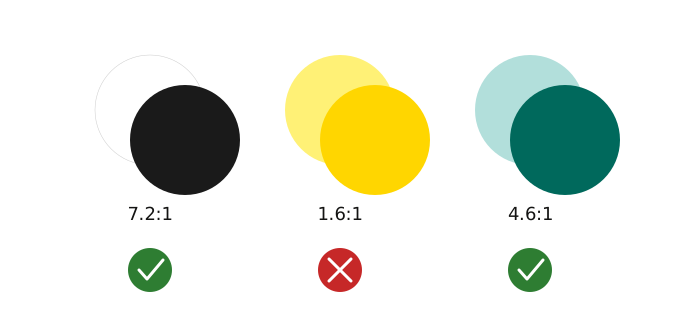
For standard body text, the minimum passing ratio under WCAG 2.1 AA (the level most small businesses and non-profits are held to legally) is 4.5 to 1. For larger text, roughly 18 point or larger, or 14 point bold, the minimum drops to 3 to 1. Buttons, icons, and any graphic that communicates something to the visitor also need to hit at least 3 to 1 against whatever is next to them.
That pale grey on white that looks so clean? It might be coming in at 1.6 to 1. That fails by a wide margin.
How to Check Yours in About a Minute
WebAIM’s Contrast Checker is free and straightforward to use. It has an eyedropper tool that lets you sample your actual text colour and your actual background colour directly from your screen. Put those two values in and it tells you whether you pass.
A couple of things worth knowing: sample the text and the background specifically, not a shadow near the text or a photo behind it. And if you have text sitting on top of a gradient or a photo, test the spot where the contrast is worst, not the spot where it looks fine.
If the test fails, the fix is usually simple. Darken the text, lighten the background, or both, until the ratio passes.
Buttons and Links Are Their Own Problem
“Ghost” buttons, the style with a thin coloured outline and no fill, are a common fail. The text inside often doesn’t have enough contrast against the page background behind it. The outline itself may not either.
Your primary call-to-action button, the one you most want visitors to click, should have a solid fill colour with text that clears 4.5 to 1 against that fill. It should also never rely on colour alone to communicate what it does. Pair colour with a label, an icon, or visual weight so that someone who can’t distinguish colours still understands what the button is for.
Your Brand Colours Probably Don’t Need to Go
Failing a contrast check doesn’t mean starting over with a new palette. In most cases you adjust the lightness of a colour until the pairing passes. Use the stronger, higher-contrast combinations for body copy and functional text. Keep your softer, lighter shades for large headings or decorative backgrounds where they aren’t carrying the weight of readability.
What Deep Sea Fauna Checks For
Contrast is one piece of a broader accessibility audit. When we review a site for WCAG 2.1 AA compliance, we look at contrast ratios across text, buttons, and graphics, but also at focus indicators (whether keyboard users can see where they are on the page), component behaviour, heading structure, and form labeling. These things work together. A site that passes on contrast but fails on keyboard navigation is still a site with legal exposure.
If you’re not sure where your site stands, that’s usually where we start.